TEST MODE: no real payments. Checkout simulates a purchase.

Obsidian vault + course · runs on Claude

“ChatGPT never remembers any of my stuff.”

Build a Jarvis that does.

You explain your job, your projects, how you like things done. Next chat, it's all gone. Jarvis is a personal AI assistant that keeps what you tell it, briefs you every morning and files everything you throw at it. It comes as one folder. Open it, type /setup, and it starts learning you.

Read a free lesson →

One-time payment · instant download · no coding

jarvis — example output
> /brief

Morning. Thursday 15 January.

Today      Dentist 14:00 · Sam 16:30
Carried    Send the lease form (due tomorrow)
Decide     Ana asked about the June trip dates
Inbox      4 items, 1 urgent: car insurance

Focus      The lease form, before lunch.

> /remember keep briefs under ten lines
Saved to memory: brief-length.
37build-along lessons
9ready-made commands
7templates
15prompts
15 minto first conversation

You've explained yourself to your AI a hundred times.

Your job. Your projects. How you like things written. Then you open a new chat and it's a stranger again. The built-in “memory” setting keeps a few scattered facts you can't really see or fix. Jarvis keeps what you tell it in plain files that it reads at the start of every session and updates itself.

A normal AI chat

  • Forgets you when you close the tab
  • You paste the same background every time
  • Answers scroll away and are gone
  • Only talks. You still do the work
  • Same mistake, every week

Your Jarvis

  • Reads its memory at the start of every session
  • Knows your projects, people and preferences
  • Saves briefs, plans and research as notes you keep
  • Files, plans, drafts and reviews for you
  • Say “remember that” once. It sticks

How it works

01

Open the folder

Unzip it and open it in Obsidian, the free notes app. Everything is already linked and organised.

02

Start Claude inside it

Install Claude Code with one pasted line. The vault's instruction file turns plain Claude into your assistant.

03

Type /setup

Jarvis interviews you for a few minutes and writes its first memories. From then on, it gets better every day you use it.

This is the actual vault

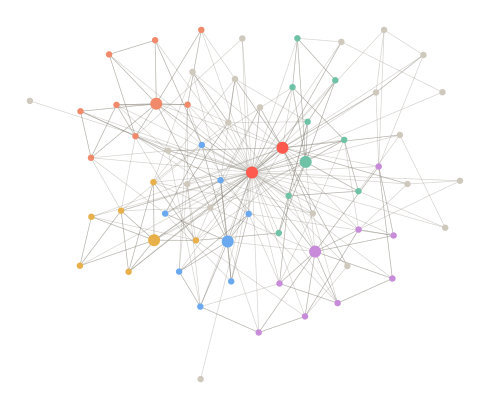
Drawn from the real files: every lesson, template and memory note, linked the way you'll see it in Obsidian's graph view. Your own notes grow around it.

Graph view of the vault: 37 lessons in five modules linked through the Command Center and the Map of Content

Meet Jarvis The Brain The Daily Driver Hands Going Further Hubs Memory, templates, your folders

Five modules. 37 build-along lessons.

The course lives inside the vault as linked notes. Every lesson ends with one thing to do, so you finish with a working assistant, not a pile of notes. Read one free →

Module 1

Meet Jarvis

Understand what you are building, install it, and have your first real conversation.

Module 2

The Brain

Give Jarvis a long-term memory, a personality, and a way to stay accurate.

Module 3

The Daily Driver

The routines that make Jarvis part of your day: brief, capture, plan, debrief, review, research.

Module 4

Hands

Connect Jarvis to your calendar and email, let it act on a schedule, and reach it from your phone.

Module 5

Going Further

Subagents, specialist teams, an always-on home, chat apps, the smart home, and keeping it all safe.

This is for you if

  • You use AI most days and are tired of repeating yourself
  • You want a system that works today, not a weekend of tinkering
  • You can copy and paste a line into a terminal
  • You like owning your notes as plain files on your own computer

It is not for you if

  • You want a phone app with nothing to install
  • You don't want to pay for a Claude plan
  • You already run your own agents, memory and hooks
  • You expect it to be perfect before you've taught it anything

What you need

A computer (Mac, Windows or Linux) · Obsidian, free · a paid Claude plan, which is separate and not included. That subscription is the only running cost, and the course shows you how to keep usage low.

One-time payment

Build Your Own Jarvis

$29 USD
  • The working assistant: memory, personality file, 9 commands, safe permissions
  • 37 lessons in 5 modules, from install to always-on
  • 7 templates and a 15-prompt library
  • Instant download. Yours to keep. Plain files, no lock-in
  • A full lesson free to read first, so you know exactly what you're getting

Secure checkout by Stripe. You get a download link immediately after payment. Digital product: all sales are final, see the refund policy.

Questions

Do I need to know how to code?

No. You paste one install line into a terminal and type commands like /brief. Every step is written out in the first module.

What else do I have to pay for?

A paid Claude plan from Anthropic. Claude Code, the tool that lets Claude read and write the vault, needs one. Obsidian is free for personal use. Nothing else is required.

Does it work with ChatGPT?

No. Jarvis runs on Claude, a different AI from Anthropic. The commands and automatic memory are built for Claude Code. The vault also includes a core prompt for the normal Claude app, and the notes are plain text, so the ideas carry over. If you only use ChatGPT, this is not the right product.

Is my data private?

Your notes are plain files on your own computer. I never see them. When Jarvis reads a note, that text is sent to Anthropic to be processed, the same as any Claude conversation. The course has a safety lesson on what to keep out.

Will it really talk and control my house like in the films?

Out of the box it is text: you type or dictate, it answers and edits your notes. Module 4 covers voice and phone access. Module 5 explains how people connect an assistant to a smart home. Those are projects you build, not a switch you flip.

How is this different from a free tutorial?

Tutorials tell you what to build. This is the built thing: instructions, memory, commands, templates and dashboard already wired together and tested, plus the lessons to understand and extend it.

How do I get it, and what if the link stops working?

You download a .zip right after checkout. The link works 5 times over 14 days. If you lose it, email [email protected] and I'll send a new one.

Can I get a refund?

It's a digital download you receive in full the moment you pay, so all sales are final. There are no refunds for a change of mind. You do get your money back if the download never reaches you, you were charged twice, or the product is materially different from what this page describes. Read the free lesson first, and see the refund policy.

Stop introducing yourself to your AI.